Use Cursor with Models Hub: Custom Base URL for Claude and GPT
Connect Cursor to Models Hub via Override OpenAI Base URL and call Claude, GPT and other models with one API key. Includes model names, verification and fixes for 'does not work with your current plan'.
Cursor lets you replace its built-in model service with your own API key and base URL. Point the base URL at Models Hub and Chat and Cmd-K use your Models Hub balance for whichever model you specify, Claude and GPT included, with no vendor accounts required.
Two things to confirm first
- Custom base URL and custom models require Cursor Pro or higher; the free tier errors out even with correct settings.
- A custom key applies to Chat and Cmd-K (inline edit) only. Tab completion always uses Cursor's own models, and Agent-mode support for custom keys varies by version; trust what your current version tells you.
Prerequisites
- Cursor installed and signed in with a Pro account. Download: cursor.com/download.
- A Models Hub API key from the Tokens page, in a group that can access the models you want.
Recommended models
Cursor speaks the OpenAI-compatible format; the Models Hub gateway converts as needed, so Claude models are added the same way.
| Use case | Model | Pricing | Live status |
|---|---|---|---|
| First choice for coding | claude-sonnet-4-6 | Price | Availability and latency |
| Reasoning and long context | gpt-5.5 | Price | Availability and latency |
| Cheap and fast for small edits | gpt-5.4-mini | Price | Availability and latency |
Model names are authoritative on the pricing page.
Setup
-
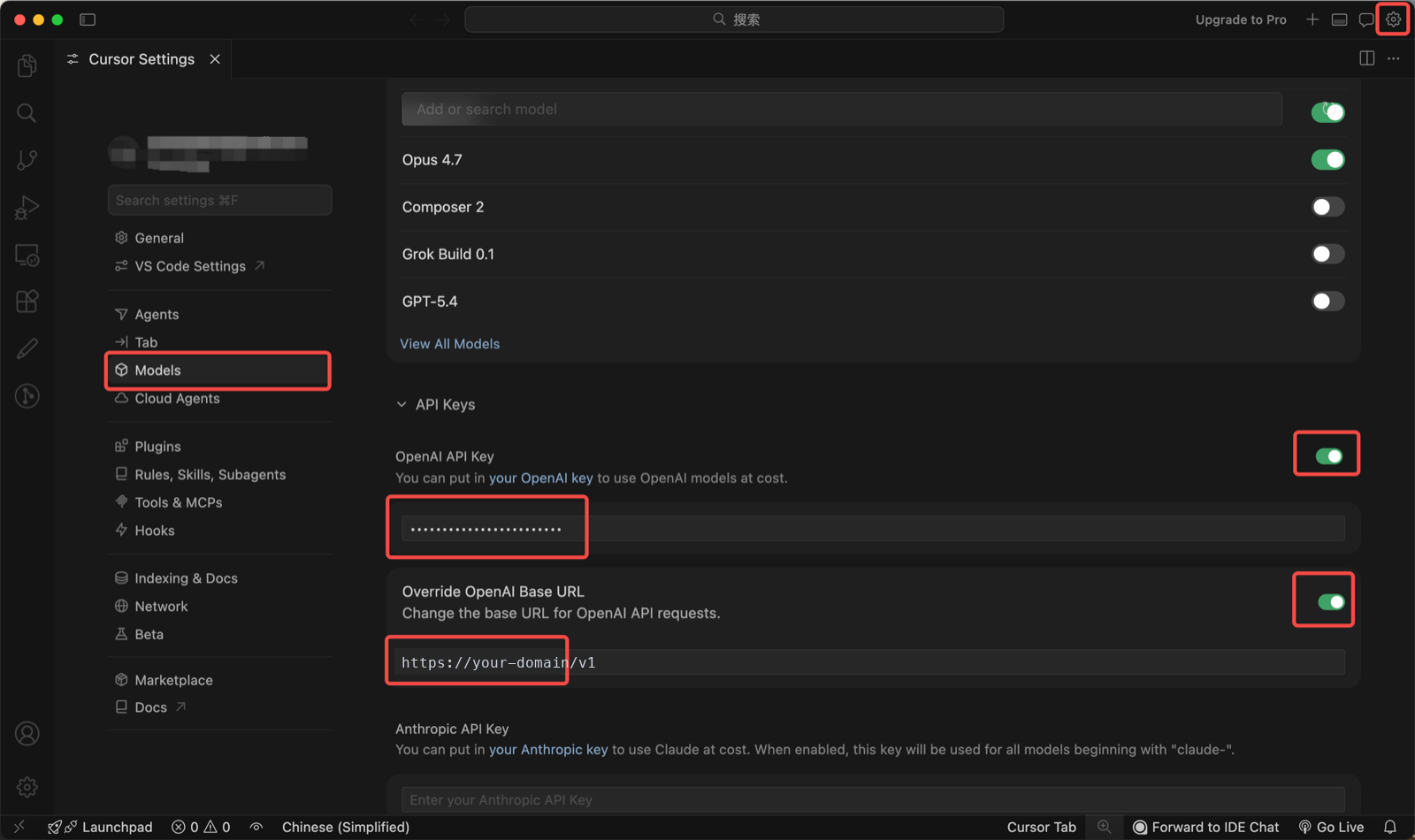
Open Cursor settings via the gear in the top-right or
Cmd + ,(Ctrl + ,on Windows) and go to Models. -
Find OpenAI API Key, turn it on and paste your Models Hub API key.
-
Expand Override OpenAI Base URL, turn it on and enter:
https://modelsok.com/v1The trailing
/v1is required; Cursor appends/chat/completionsafter it. -
Click Verify. On success the toggle stays on; on failure Cursor shows a reason, see the error table below.
-
Under Add Custom Model, enter the model names above one at a time and enable them in the list. Unticking Cursor's built-in models avoids accidentally spending other balances.
Verify
Open Chat (Cmd + L), pick your custom model in the dropdown and send "describe this project in one sentence". A reply means you're connected. Then check Usage logs in the Models Hub console: a request under that model name confirms traffic is going through Models Hub rather than Cursor's own service.
Common errors
| Symptom | Cause | Fix |
|---|---|---|
The model xxx does not work with your current plan or api key | Free tier doesn't support custom models; or the model name doesn't exist on Models Hub | Upgrade to Pro; check the name on the pricing page |
| Verify fails with a connection error | Wrong base URL, most often a missing /v1 or stray whitespace | Re-enter https://modelsok.com/v1 |
Invalid API key / 401 | Incomplete key, or the token is disabled | Re-copy from the Tokens page |
Slow replies or 429 | Rate limited by concurrency | Retry shortly; contact support for a higher limit if it persists |
| Nothing shows in usage logs | Requests went to Cursor's own service | Make sure the Override toggle is on and the chat dropdown has your custom model selected |
| Tab completion unchanged | Expected; Tab doesn't use custom keys | Nothing to do |
More in Troubleshooting.
FAQ
How is it billed? Per input and output token actually consumed, at each model's pricing-page rate. Cursor Chat sends context files along with your message, so long conversations cost noticeably more than single questions; usage logs show token counts per request.
Can I keep Cursor's built-in models too? Yes. Custom and built-in models share the same dropdown. Enabling only custom models just prevents accidental use of Cursor's balance.
Why do Claude models go under the OpenAI setting? Cursor only allows overriding the OpenAI base URL. The Models Hub gateway converts OpenAI-format requests for Claude; you just enter the model name.
Related
- Claude Code setup: the terminal counterpart, with one-command setup
- Model pricing and model status
- Codex CLI setup, Cherry Studio setup
Use Copilot CLI with Models Hub: BYOK Environment Variables
Point GitHub Copilot CLI at Models Hub using BYOK environment variables; use the anthropic protocol type to avoid reasoning-model errors, with verification and error troubleshooting.
Use Cline with Models Hub: OpenAI Compatible and Anthropic Setup
Connect the VS Code extension Cline to Models Hub via either OpenAI Compatible or Anthropic provider, with field details, verification steps, and error troubleshooting.