Use Codex CLI with Models Hub: One-Click Setup and config.toml
Configure Codex CLI for Models Hub with one Models Hub CLI command, or edit ~/.codex/config.toml manually to add a custom model provider, with verification and error troubleshooting.
Codex CLI is OpenAI's official terminal coding agent, running locally and reading/editing your project files directly. Point its model provider at Models Hub and every chat and code edit inside codex uses your Models Hub balance for whichever model you choose. This page covers the connection only, not how to use Codex CLI itself.
Three things you need
A Models Hub API key, the base URL https://modelsok.com, and a model name. The one-command setup below takes about 30 seconds.
Prerequisites
- Codex CLI installed. If not, follow the official install instructions and run
npm install -g @openai/codex;codex --versionshould print a version afterward. - A Models Hub API key, created on the Tokens page. The token's group must have access to the models you plan to use.
Recommended models
| Use case | Model | Pricing | Live status |
|---|---|---|---|
| Highest quality for complex coding | gpt-6-astra | Price | Availability and latency |
| Everyday coding | gpt-5.5 | Price | Availability and latency |
| Harder reasoning and long tasks | gpt-5.6-luna | Price | Availability and latency |
| Cheap and fast for small edits | gpt-5.4-mini | Price | Availability and latency |
Model names are authoritative on the pricing page.
Option 1: one-command setup (recommended)
The Models Hub CLI writes your API key, base URL and default model into ~/.codex/config.toml and ~/.codex/auth.json.
macOS / Linux:
curl -fsSL https://modelsok.com/cli/install.sh | shWindows (PowerShell):
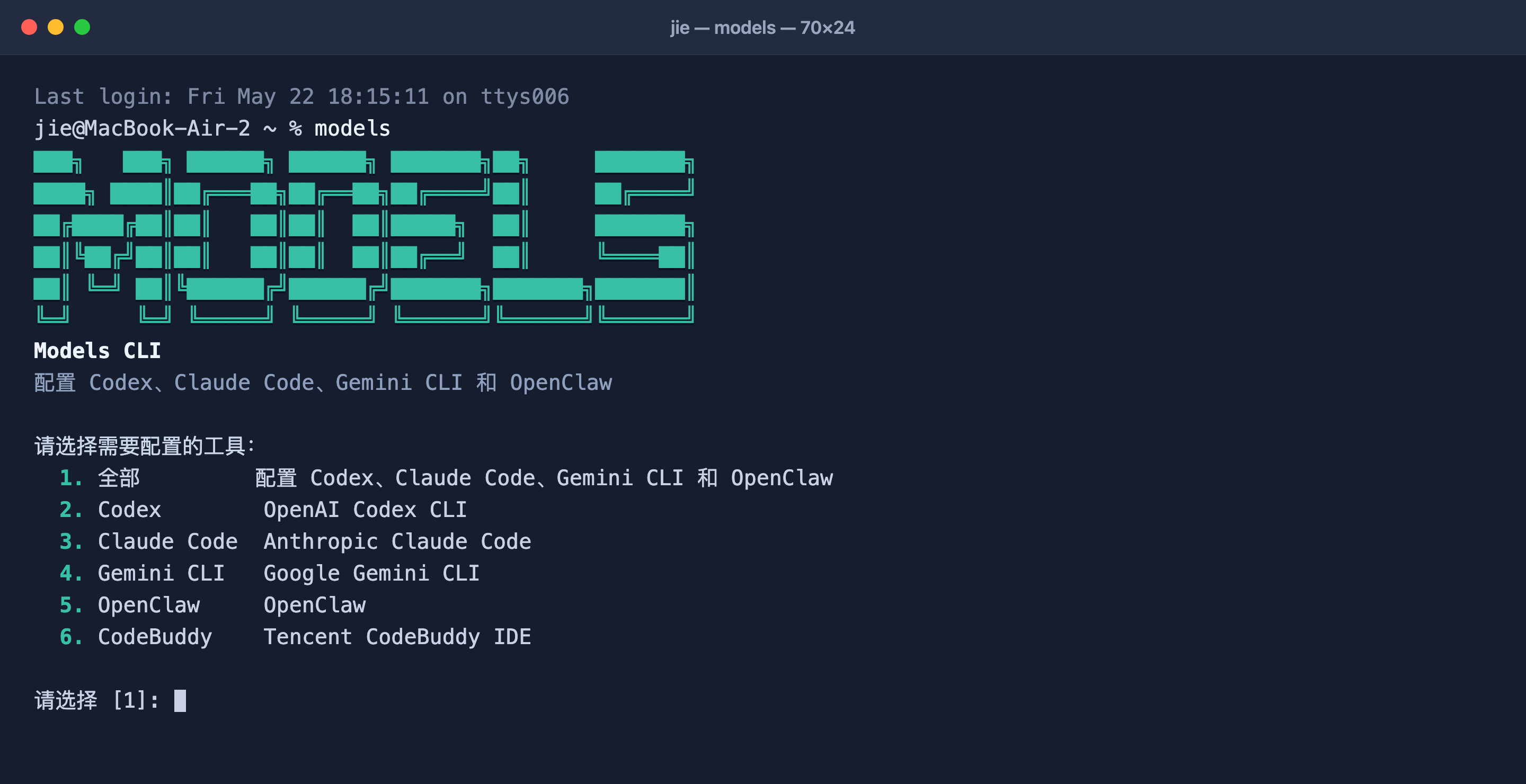
powershell -ExecutionPolicy Bypass -c "irm https://modelsok.com/cli/install.ps1 | iex"After installing, run models, choose Codex from the interactive menu, and paste your API key and pick a model when prompted. Or run it non-interactively: models configure --target codex --api-key <your-api-key>. The default model is gpt-5.5; pick a different one from the table above during setup, or pass --codex-model. Full reference: CLI one-command setup.
Option 2: manual setup
Codex uses the Responses API
Codex custom providers use the Responses protocol. Models Hub has verified gpt-6-astra through /v1/responses; set wire_api = "responses" explicitly and do not switch Codex to Chat Completions.
First export your key in the current shell, or in .zshrc / .bashrc:
export MODELSOK_API_KEY="your-models-hub-api-key"Then edit ~/.codex/config.toml to add a custom provider and make it the default:
model = "gpt-6-astra"
model_provider = "modelsok"
model_reasoning_effort = "low"

[model_providers.modelsok]
name = "Models Hub"
base_url = "https://modelsok.com/v1"
env_key = "MODELSOK_API_KEY"
wire_api = "responses"
stream_idle_timeout_ms = 300000| Field | Purpose |
|---|---|
model | Default model name; check the pricing page for the current name |
model_provider | Top-level field pointing at a provider id under model_providers |
model_reasoning_effort | Reasoning effort. gpt-6-astra does not support none; start with low for latency-sensitive work |
model_providers.modelsok.base_url | Models Hub base URL, fixed at https://modelsok.com/v1 |
model_providers.modelsok.env_key | The environment variable holding your API key; it must be exported before codex starts |
model_providers.modelsok.wire_api | Protocol used by Codex, fixed at responses |
model_providers.modelsok.stream_idle_timeout_ms | Streaming idle timeout; this five-minute example does not eliminate an upstream provider timeout |
Verify
Run codex in any project and ask something like "describe this directory in one sentence". A normal reply means you're connected. Then open Usage logs in the Models Hub console; a request under your configured model name appears within seconds.
Common errors
| Symptom | Cause | Fix |
|---|---|---|
401 / authentication failure | Wrong key, stray whitespace, or a disabled token | Re-copy from the Tokens page; if you used one-click setup, rerun models |
model not found / no available channel | Misspelled model name, or the token's group can't access it | Check the name on the pricing page |
| 404 / connection failure (manual setup) | Incorrect base_url or wire_api | Confirm base_url = "https://modelsok.com/v1" and wire_api = "responses" |
524 / a long wait for the first reply | Slow upstream time to first token or an upstream timeout; higher reasoning effort adds latency | Set model_reasoning_effort to low; if it persists, contact support with both request IDs |
429 | Rate limited, usually too much concurrency | Retry shortly; contact support for a higher limit if it persists |
| Env var stops working in a new terminal | export only lasts for the current session | Add it to .zshrc / .bashrc and reopen the terminal, or use the auth.json written by one-click setup instead |
More in Troubleshooting.
FAQ
How is it billed? Per input and output token actually consumed, at the price on each model's pricing page; every request is itemized in usage logs.
How is this different from using my OpenAI account directly? Once configured, every Codex CLI request — including the preset models — goes through Models Hub instead of your official account's quota, and you don't need a ChatGPT Plus/Pro subscription.
How do I switch models? Type /model inside Codex CLI, or edit the model field in config.toml and restart.
Does gpt-6-astra use a different API from GPT-5.6? Codex uses the Responses API for both, with the same base URL. GPT-6 has stricter parameter constraints, including no reasoning_effort = "none"; see the GPT-6 Astra guide for the full compatibility notes.
Related
- CLI one-command setup: the same tool also configures Claude Code, Gemini CLI and OpenClaw
- Model pricing and model status
- Claude Code setup, OpenClaw setup
Use Claude Code with Models Hub: Base URL and API Key Setup
Run Claude Code on Models Hub's Claude models: one-command setup or manual ANTHROPIC_BASE_URL and API key configuration, with verification steps and error troubleshooting.
Use Gemini CLI with Models Hub: One-Click and Manual Setup
Configure Gemini CLI for Models Hub with one Models Hub CLI command, or edit settings.json and .env manually to reach Google Gemini models, with verification and error troubleshooting.