Use Claude Code with Models Hub: Base URL and API Key Setup
Run Claude Code on Models Hub's Claude models: one-command setup or manual ANTHROPIC_BASE_URL and API key configuration, with verification steps and error troubleshooting.
Claude Code is Anthropic's official terminal coding assistant. Point it at Models Hub and it uses your Models Hub balance for the Claude model family, with the same request format, streaming and tool calls. This page covers the connection only, not how to use Claude Code itself.
Three things you need
A Models Hub API key, the base URL https://modelsok.com, and a model name. Pick either method below; the one-command path takes about 30 seconds.
Prerequisites
- Claude Code installed. If not, follow the official setup guide: on macOS / Linux run
curl -fsSL https://claude.ai/install.sh | bash; on Windows runirm https://claude.ai/install.ps1 | iexin PowerShell.claude --versionshould print a version. - A Models Hub API key, created on the Tokens page. The token's group must have access to the models you plan to use.
Recommended models
| Use case | Model | Pricing | Live status |
|---|---|---|---|
| Everyday coding, best balance of speed and quality | claude-sonnet-4-6 | Price | Availability and latency |
| Complex refactors and long tasks | claude-opus-4-6 | Price | Availability and latency |
| Background lightweight tasks (file search, summaries) | claude-haiku-4-5 | Price | Availability and latency |
Model names are authoritative on the pricing page. Names change as new models ship; don't copy stale names from elsewhere.
Option 1: one-command setup (recommended)
The Models Hub CLI merges your API key, base URL and default model into the env block of ~/.claude/settings.json, keeping any other settings you already have.
macOS / Linux:
curl -fsSL https://modelsok.com/cli/install.sh | shWindows (PowerShell):
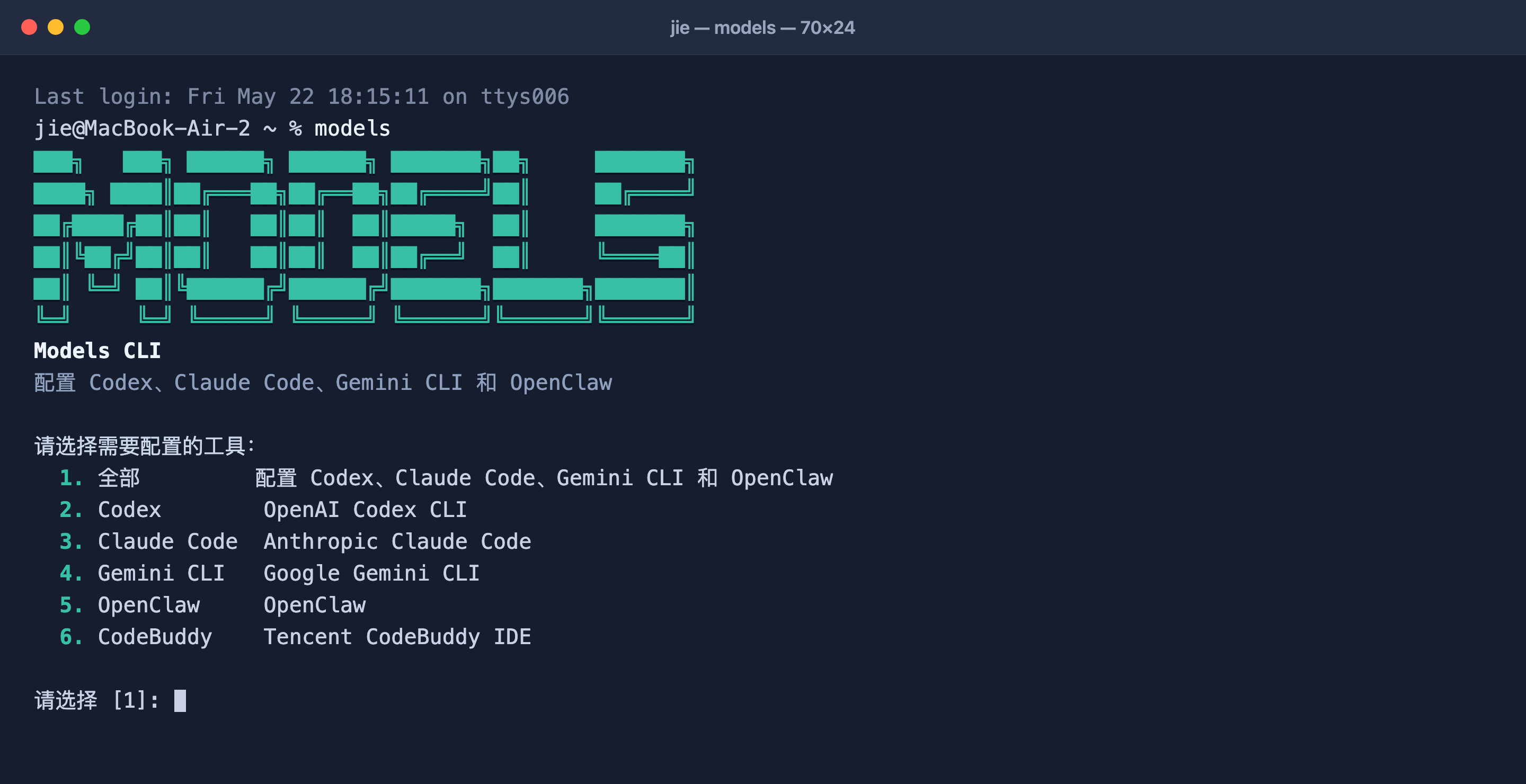
powershell -ExecutionPolicy Bypass -c "irm https://modelsok.com/cli/install.ps1 | iex"After installing the models command the script opens an interactive menu. Choose claude, paste your API key and pick a model. To change the model or key later, run models again. Full CLI reference: CLI one-command setup.
Option 2: manual setup
Edit ~/.claude/settings.json (%USERPROFILE%\.claude\settings.json on Windows); create it if missing. Put four variables in the env block:
{
  "env": {
    "ANTHROPIC_BASE_URL": "https://modelsok.com",
    "ANTHROPIC_AUTH_TOKEN": "sk-your-models-hub-api-key",
    "ANTHROPIC_MODEL": "claude-sonnet-4-6",
    "ANTHROPIC_SMALL_FAST_MODEL": "claude-haiku-4-5"
  }
}
What each variable does:
| Variable | Purpose |
|---|---|
ANTHROPIC_BASE_URL | Base URL. Do not append /v1; Claude Code builds the path itself |
ANTHROPIC_AUTH_TOKEN | Your Models Hub API key, sent as a Bearer token |
ANTHROPIC_MODEL | Default model, i.e. the current selection in /model |
ANTHROPIC_SMALL_FAST_MODEL | Model for Claude Code's background helper tasks; pick a cheap one |
For a quick test you can also export these variables in the current shell and run claude; they disappear when the terminal closes.
Account login vs. environment variables
If you previously signed in to Claude Code with a claude.ai account, setting these variables routes requests through Models Hub instead and stops using your claude.ai subscription. Remove the variables to switch back.
Verify
Run claude in any project and ask something like "describe this directory in one sentence". A normal reply means you're connected. Two extra checks:
- Type
/statusinside Claude Code; the API base URL should point tomodelsok.com. - Open Usage logs in the Models Hub console; a request under your configured model name appears within seconds.
Common errors
| Symptom | Cause | Fix |
|---|---|---|
401 / authentication_error | Wrong key, stray whitespace, or a disabled token | Re-copy from the Tokens page; make sure the sk- prefix is present |
model not found / no available channel | Misspelled model name, or the token's group can't access that model | Check the name on the pricing page; switch to a group that includes the model |
429 / rate_limit | Rate limited, usually too much concurrency | Retry shortly; contact support for a higher limit if it persists |
| Insufficient balance | Token quota or account balance exhausted | Top up in the console, or raise the token's quota |
| Replies still come from your claude.ai account | settings.json not picked up | Confirm the file path and that the JSON is valid; /status shows the active base URL |
More in Troubleshooting.
FAQ
How is it billed? Per input and output token actually consumed, at the price on each model's pricing page; cached tokens are discounted. Every request is itemized in usage logs.
How is this different from the Anthropic API directly? The request format is identical; only the base URL changes. You don't need an Anthropic account, and the same key also works for other vendors' models.
How do I switch models? Type /model inside Claude Code, or change ANTHROPIC_MODEL and restart.
Related
- CLI one-command setup: the same tool also configures Codex, Gemini CLI and OpenClaw
- Model pricing and model status
- Cursor setup, Codex CLI setup
Connecting Agent Tools
Integration guides for AI agents and client tools that already support connecting to Models Hub.
Use Codex CLI with Models Hub: One-Click Setup and config.toml
Configure Codex CLI for Models Hub with one Models Hub CLI command, or edit ~/.codex/config.toml manually to add a custom model provider, with verification and error troubleshooting.